BLoC Pattern with React Hooks
The BLoC Pattern has been designed by Paolo Soares and Cong Hui, from Google and first presented during the DartConf 2018 (January 23-24, 2018). See the video on YouTube.
BLoC stands for Business Logic Component. Initially conceived to share code between Flutter and Angular Dart, it works independently of platform: web application, mobile application, or back-end.
It offers an alternative to the Redux port for flutter using Dart streams. We'll use Observables from RxJS, though xstream works equally well.
In short, the BLoC will:
- contain business logic (ideally in bigger applications we will have multiple BLoCs)
- rely exclusively on the use of Observables for both input (Observer) and output (Observable)
- remain platform independent
- remain environment independent
How BLoC works?
Others have explained BLoC better than I will here, so I'll cover just the basics.
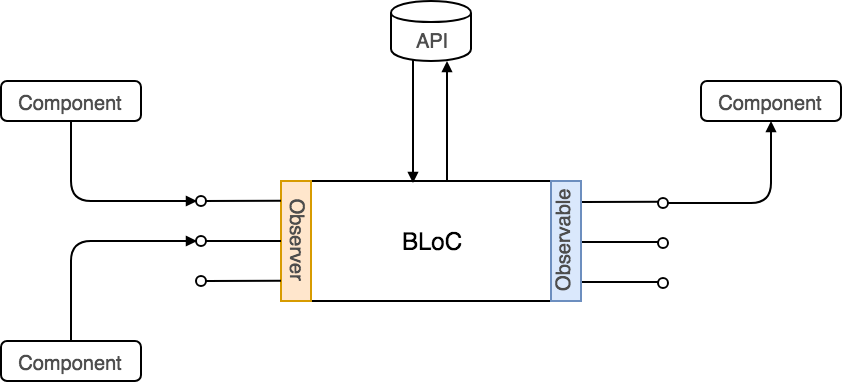
The BLoC holds business logic; components know nothing about its internals. Components send events to the BLoC via Observers and receive notifications via Observables.
Implementing the BLoC
Here is a basic TypeScript search BLoC using RxJS:
export class SearchBloc {private _results$: Observable<string[]>;private _preamble$: Observable<string>;private _query$ = new BehaviorSubject<string>("");constructor(private api: API) {this._results$ = this._query$.pipe(switchMap((query) => {return observableFrom(this.api.search(query));}),);this._preamble$ = this.results$.pipe(withLatestFrom(this._query$, (_, q) => {return q ? `Results for ${q}` : "All results";}),);}get results$(): Observable<string[]> {return this._results$;}get preamble$(): Observable<string> {return this._preamble$;}get query(): Observer<string> {return this._query$;}dispose() {this._query$.complete();}}
results$ and preamble$ expose asynchronous values that change when query
changes.
query exposes an Observer<string> for components to add new values. Inside
SearchBloc, _query$: BehaviorSubject<string> serves as the stream source,
and the constructor declares _results$ and _preamble$ to respond to
_query$.
Using it on React
To use it in React, create a BLoC instance and share it with child components via React context.
const searchBloc = new SearchBloc(new API());const SearchContext = React.createContext(searchBloc);
Expose it using the context provider:
const App = () => {const searchBloc = useContext(SearchContext);useEffect(() => {return searchBloc.dispose;}, [searchBloc]);return (<SearchContext.Provider><SearchInput /><ResultList /></SearchContext.Provider>);};
The useEffect returns the dispose method, completing the observer when the
component unmounts.
Publish changes to the BLoC from the SearchInput component:
const SearchInput = () => {const searchBloc = useContext(SearchContext);const [query, setQuery] = useState("");useEffect(() => {searchBloc.query.next(query);}, [searchBloc, query]);return (<inputtype="text"name="Search"value={query}onChange={({ target }) => setQuery(target.value)}/>);};
We get the BLoC via useContext, then useEffect publishes each query change
to the BLoC.
Now the ResultList:
const ResultList = () => {const searchBloc = useContext(SearchContext);const [results, setResults] = useState([]);useEffect(() => {return searchBloc.results$.subscribe(setResults);}, [searchBloc]);return (<div>{results.map(({ id, name }) => (<div key={id}>{name}</div>))}</div>);};
We use useContext to get the BLoC, then useEffect subscribes to results$
changes to update local state. Returning the subscription unsubscribes when the
component unmounts.
Final thoughts
The final code is straightforward with basic knowledge of Observables and
hooks. The code is readable and keeps business logic outside components. We
must remember to unsubscribe from observables and dispose the BLoC on unmount,
but custom hooks like useBlocObservable and useBlocObserver could solve
this. I plan to try this in a side project where I use this pattern.